Send It Secure (Protected Trust) — help & common fixes
Using Send It Secure, or the Protected Trust button in Outlook? You're in the right place. Below are quick fixes for the most common questions. Find the one that matches, and if it isn't here the rest of this Help Center has a guide for just about everything.
You may know us as Protected Trust. Same company and team, we're now Send It Secure, and the button in Outlook may still show the Protected Trust name.
|
You're never stuck. Even if the Outlook add-in or another integration is acting up, you can sign in to the web portal from any browser and still write a new secure message, open your Inbox, and check your Sent folder. Sign in at app.senditsecure.com. |
The Outlook button is missing
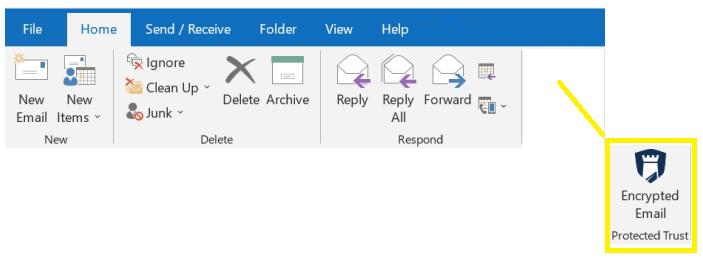
The button sits on your Outlook Home ribbon and may be labeled Encrypted Email or Protected Trust. If your ribbon looks like this, with no button, the steps below will bring it back.
|
Start here. The right fix depends on which Outlook you're using, and there are two different add-ins, so it's worth checking which version you have first. Then follow the step that matches. |
It was there and disappeared, or it's disabled. Outlook sometimes turns add-ins off after a crash or an update. Here's how to switch it back on: re-enabling a disabled Outlook add-in.
New computer, or the New Outlook (also Mac or web). You just need to add it: add the Send It Secure add-in.
Outlook classic on Windows. The ribbon button comes with Send It Secure for Windows: the Outlook (classic) add-in.
Reset your password
Here's how: reset your password.
Your phone number changed
If the phone number on your account (your recovery phone) changed, here's how to update it: update your recovery phone.
Opening and sending secure messages
- How do I open a secure message?
- Why wasn't I asked for a code or phone number?
- Why is my recipient asked to sign in?
Delivery, accounts, and other apps
- Notifications landing in spam? Add us as a safe sender
- See who opened a message
- Add users to your account
- Send from the software you already use
Still need help?
If none of these does it, reach a support representative and we'll take care of it. We usually reply within a few hours during business hours, and the same business day for sure. It helps to include the email address on your account, a quick screenshot of what you're seeing, and for Outlook, which version you're using.
Looking for pricing or a sales question instead? Visit sales.senditsecure.com.