Manage pending invitations & users
A disabled user stays in your organization but can no longer access their account. You can view your disabled users and re-enable (set active) any of them from the User List. Disabled users do not count toward your license count.
|
Admin only. You must be an administrator to manage users. |
Enable a disabled user
- Go to app.protectedtrust.com/Dashboard and sign in.
- From the Dashboard, select User List, then Disabled Users from the drop-down.
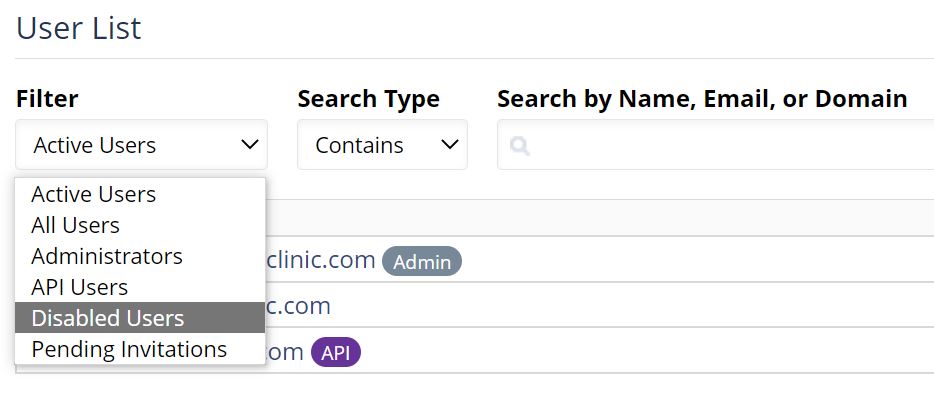
- Click the email address of the user you'd like to enable — this opens their Profile page.
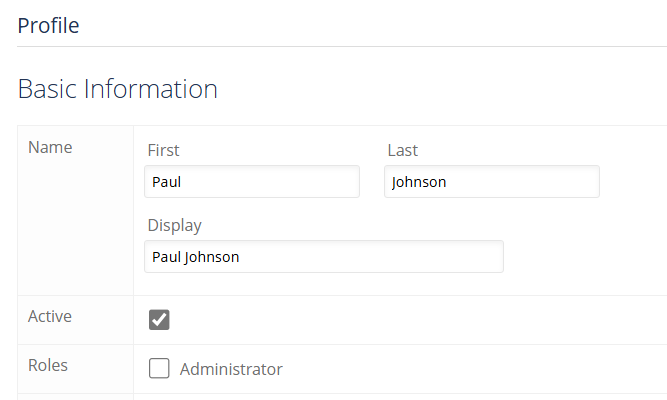
- Check the Active box and click Save. The user is now active and appears in the Active Users list.
Related
- Disable a user — disable a user in your organization.
- Manage pending invitations — resend or revoke invitations that haven't been accepted yet.
- Add Users — invite new users to your organization.